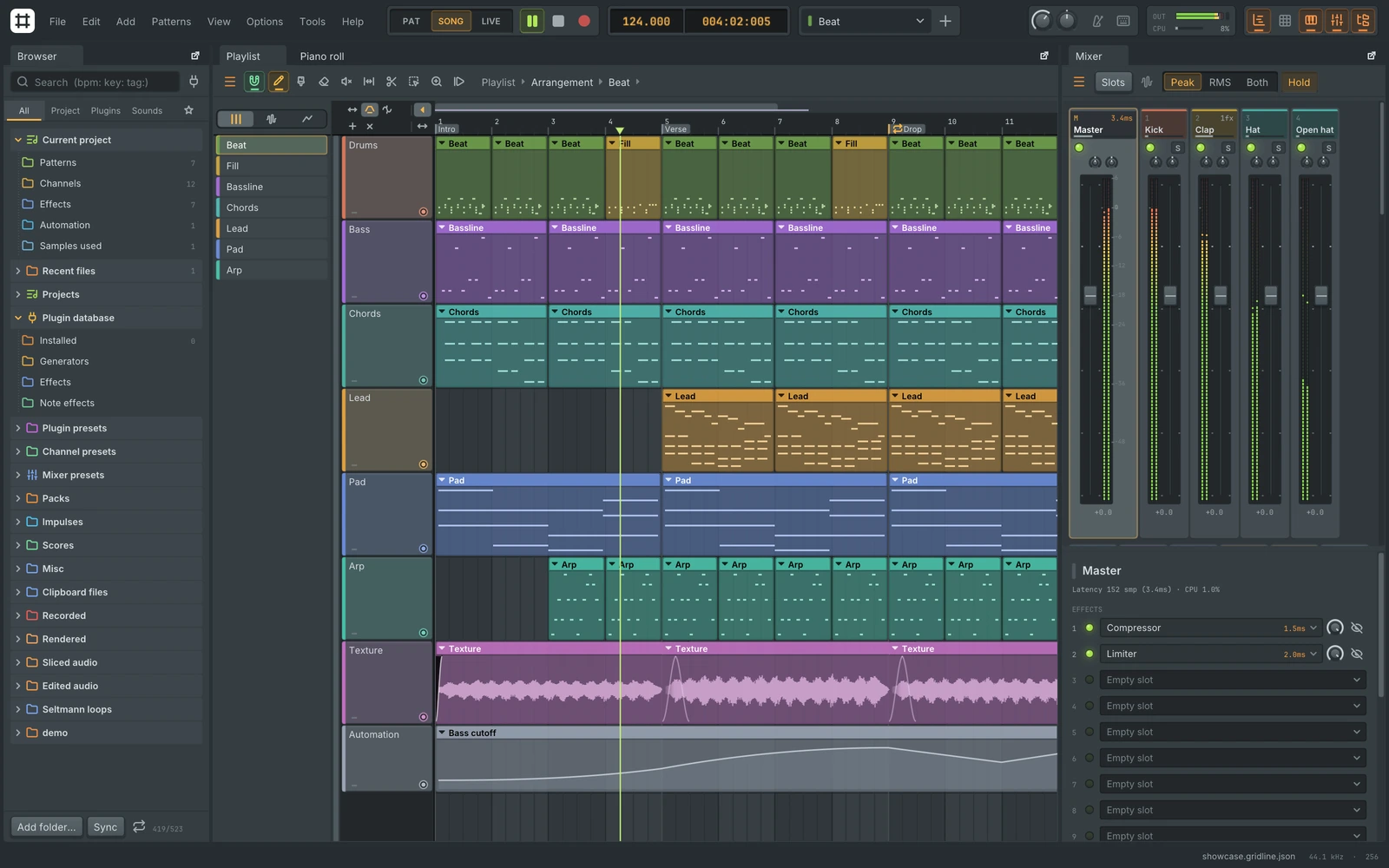
You do not have to start from an empty timeline to try a different music workstation. Gridline is a free, open-source DAW aimed at people who like FL Studio's pattern-based way of making music. Its pitch is familiar tools, existing project import and desktop downloads without a trial timer.
There is one important detail behind the Reddit announcement: Gridline is independent of ArtCraft. Its developer, u/lolitemaultes, clarified that it is inspired by the ArtCraft suite, rather than made by its team. It is also unaffiliated with Image-Line, the company behind FL Studio. Read the original announcement and developer replies.
We checked the public repository, tagged documentation and release assets on 1 November 2026. This is a source-based look, not a hands-on audio review or a promise that every FL Studio project will transfer perfectly.
There are downloads, not just screenshots
At the time of checking, the latest published release is Gridline 0.7.1, released on 1 November. GitHub lists Windows x64 and ARM64 installers and portable archives, a universal macOS download, Linux packages for x86-64 and ARM64, and BSD archives. It is marked as a regular release rather than a pre-release. That label does not establish production reliability.
Gridline is GPL-3.0 software. The developer describes the application as free, with no trial or feature paywall. Existing paid plugins and sample rights remain separate considerations. Release notes and downloads.
Cover image: the project's own Gridline workspace screenshot, from the v0.7.1 repository. Credit: lolitemaultes / Gridline contributors.
What FL Studio compatibility actually means
Gridline documents import of .flp projects, zipped loop packages and .fst presets, plus export back to FL Studio project formats. Channels, patterns, notes, arrangement clips, automation and mixer routing are among the documented imports.
The distinction is sound compatibility. FL Studio's own instruments and effects are mapped to Gridline equivalents. Installed third-party plugins can retain their saved state; unavailable ones may remain as placeholders, with documented substitutes for selected plugins. That is a useful migration path, not evidence of identical sound in every project. Versioned compatibility documentation.
Our recommendation: try a copy of a project you know well and compare the render, automation and plugin behaviour before moving important work.
You can try its instruments without moving your whole studio
The channel rack, step sequencer, piano roll, playlist and mixer are built around making patterns and arranging them into a song. Gridline also hosts plugin formats including VST3, CLAP, VST2, AU and LV2, with availability dependent on the platform.
A less disruptive route is the Gridline Suite. Its documentation lists 119 instruments and effects packaged for other DAWs, with VST3 and CLAP bundles and Audio Unit on macOS. These are Gridline's own tools made available as plugins, not a bundle of FL Studio's proprietary instruments. Gridline Suite documentation.
For someone already comfortable in another DAW, trying a few instruments may be more useful than replacing their entire setup immediately.
Collaboration has a significant plugin limit
The project documents live, peer-to-peer collaboration with encrypted project sharing and no Gridline account. Each participant keeps a local project copy.
However, collaborative projects currently use Gridline's own plugins only, and participants need the same version and build. A project containing external plugins cannot simply become a collaborative session unchanged. Network conditions also matter: the documentation describes direct connections, router traversal and optional relay arrangements.
That makes this interesting for a shared session built around the included tools, rather than an automatic solution for every existing studio project. Collaboration requirements.
Local stem separation comes with its own requirements
Gridline documents separation into vocals, drums, bass and other audio, with a six-stem option adding guitar and piano. Processing runs on the user's computer after the model is obtained.
Its stem guide lists model downloads of 55–337 MB and roughly 2–3 GB of working memory. It also warns about sound leaking between stems and rough piano separation. The trained model files are separate from Gridline and have their own licence notice; the guide describes them as supplied for research use. Review that notice for your intended use rather than assuming the application's GPL licence covers every component. Stem separation guide.
Today's update also tackles sample paperwork
Version 0.7.1 adds Track Receipt, which measures use of source recordings and exports information for sample-licence paperwork. It also adds Turntable and recording improvements. Track Receipt does not grant permission to use a sample or replace checking its licence. What's new in 0.7.1.
Who should take a closer look?
Gridline looks worth evaluating if you want a free pattern-based workstation, want to explore music production on Linux, or prefer trying open-source instruments inside your existing DAW. Producers whose work depends on exact plugin reproduction should approach migration more cautiously.
The downloads are unsigned by Apple and Microsoft, according to the project. Checksums are published, but they are not a security audit. We have not installed the binaries or independently tested the developer's performance and compatibility claims.
Start with the official repository and release files. Keep a known-good copy of your music project, and judge the tool on the work you need it to do.
For more discoveries, explore RepoQuarry's catalogue and our earlier ArtCraft versus Adobe assessment. The useful question is which part of your workflow a tool can genuinely improve.