ArtCraft is worth investigating as a set of open source alternatives to Adobe tools. It is not evidence that every Adobe workflow can be replaced today. Installers exist, development is active, and some users report useful results. The official catalogue still labels the apps as early alpha or in development.
This article separates three things: what the project publishes, what individual users report, and what you should test on your own files. Sources were checked on 19 October 2026. RepoQuarry has reviewed documentation and public discussions; we have not installed or benchmarked these apps.
What is ArtCraft, and which part competes with Adobe?
The name can cause confusion. ArtCraft has an AI image and video studio, alongside a family called Crafting Apps. The official catalogue currently lists thirteen native Rust apps covering creative and productivity tasks. The Adobe discussion mainly concerns PhotoCraft, VectorCraft, FilmCraft, LightCraft, PdfCraft, EffectCraft and DesignCraft.
At the time of checking, PhotoCraft, PdfCraft and FigCraft were labelled early alpha. The other catalogue entries were marked in development. These labels sit alongside downloadable installers. “In development” does not mean there is nothing to try; having an installer does not establish production readiness.
For a task-based shortlist, see RepoQuarry’s Adobe Creative Cloud alternatives. A tool that handles one job well can be useful without replacing an entire suite.
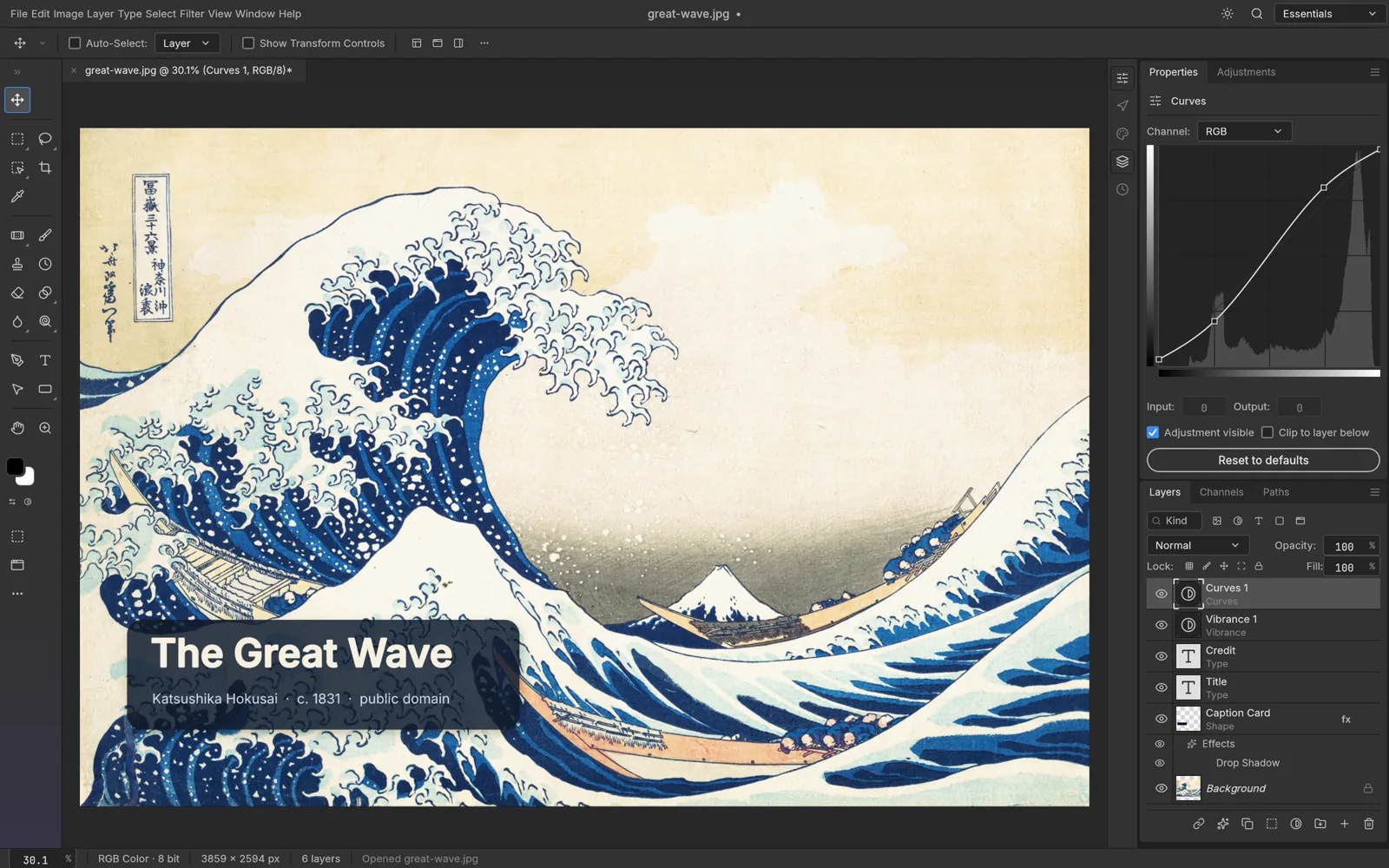
Official PhotoCraft screenshot, reproduced as a product reference. Source: ArtCraft. This is not a screenshot from our own testing.
What is available to try?
PhotoCraft: start with a layered image
The PhotoCraft page describes layers, masks, adjustment layers, brushes and layered PSD/PSB files. Its standalone downloads point to version 0.7.0 for several platforms. The page also publishes its own file round-trip test results. Those are project-reported results, not independent assurance that your documents will survive unchanged.
The linked v0.7.0 release notes include fixes for mask thumbnails, brush behaviour and selection handling. These are useful signs of concrete engineering work. They also show why the exact version matters when reading a review or filing a bug.
Try this: open a copy of a layered document, change text and a mask, export it, then reopen it in your usual application. Inspect fonts, effects, colour and editability.
PdfCraft: choose a specific document job
The PdfCraft page offers reading, page organisation, combining, splitting and document security, with standalone version 0.6.0 downloads. Its release notes document rendering, printing and input-method changes.
That makes a small document task a sensible starting point. Combining two PDFs is a different requirement from building complex forms or meeting a client’s accessibility and signature requirements. Test the job you need rather than treating “PDF support” as a complete Acrobat comparison.
Video, RAW photography and the rest
FilmCraft, LightCraft, VectorCraft, EffectCraft and DesignCraft cover ambitious categories. The catalogue’s development labels remain important. A recognisable interface or a successful demo cannot answer every question about codecs, colour, plug-ins, print output or project interchange.
For these workflows, record the build, operating system, input format and final output. It is much easier to assess “this build exported my 30-second project with correct audio timing” than “this replaces Adobe”.
What are people actually saying?
The public discussion contains enthusiasm and caution, sometimes from the same person. The examples below are a small, self-selected sample, not a survey or a verdict on every current build.
Some users already find it useful
In a PhotoCraft workflow thread, u/Aesthetic_Aditi says they have moved their workflow from Photoshop while acknowledging the project still has a long way to go. One occasional user in the replies says familiar layers and interface controls are enough for their needs.
That is a meaningful reason to try it. If your work uses a limited set of tools, you do not necessarily need every feature of a mature commercial application.
Positive experiences can still have limits
The same thread’s author reports a poor experience with the Camera Raw filter. Another commenter reports difficulty using FilmCraft with 4K and AV1 material. These are individual accounts, with limited information about exact versions and test conditions. They identify good test cases; they do not prove those problems affect every installation.
An earlier Hacker News discussion similarly raised concerns about RAW processing and colour output. Because the apps are changing, treat older reports as questions to recheck, not permanent feature descriptions.
The argument is also about expectations
In a separate Adobe-alternatives discussion, the original poster argues that an unfinished open project can still be valuable and urges people to test real files and report bugs. Replies include a user whose forms-development needs are not yet met.
Both views can be reasonable. A hobbyist looking for basic editing and a professional delivering complex client files have different thresholds. The useful question is not whether everyone should switch. It is which task a particular build can handle reliably enough for you.
Does “free ArtCraft” mean free AI generation?
Keep the Crafting Apps separate from the AI studio’s generation costs. The catalogue describes the creative apps as free and open source. The ArtCraft pricing page separately offers generation-credit subscriptions and credit packs, and says the studio can be used without a subscription with your own compute and third-party subscriptions.
Do not assume that every cloud model call, service or generation is free because an app’s code is open. Check the specific app, model, licence and service you intend to use. This article makes no blanket commercial-use or cost claim across all integrations.
A four-step test before replacing an Adobe task
- Open a copy. Use a representative file without risking the original. Note the app version, operating system and file format.
- Do the actual task. Edit the layers, retouch the image, organise the pages or assemble the sequence you normally need.
- Export and reopen. Check the output in the application or viewer used by your client, colleague or printer.
- Inspect the result and the effort. Look at fonts, layers, colour, timing, file size, reliability and time spent fixing problems.
For RAW work, include files from your camera and inspect colour and detail. For video, test your real codecs and audio. For PDFs, include the forms, fonts and document features your job depends on.
Keep the existing workflow available until the alternative has passed the checks that matter to you. Reporting a reproducible failure can also help an early project improve.
So, is ArtCraft an Adobe replacement?
For some tasks and users, it may already be a useful alternative. For the whole Adobe workflow, the evidence reviewed here does not justify a universal yes.
The promising part is concrete: public code, installers, release notes and users describing work they can do. The caution is equally concrete: early-stage labels, differing user requirements and reports that deserve version-specific testing.
RepoQuarry’s role is to help you compare those conditions. Start with the Adobe alternatives comparison, follow the official sources and choose one real task to investigate. Our checking methodology explains how sourced facts differ from hands-on validation.
Which Adobe task would you test first, and what would a successful result need to preserve?
Research notes
- Official availability and status: Crafting Apps, PhotoCraft, PdfCraft.
- Version references: PhotoCraft v0.7.0 and PdfCraft v0.6.0, as linked by the app pages when reviewed. These are not a claim that every repository or nightly build uses the same version.
- Community accounts are attributed above. Opinions, reported failures and predictions are not presented as verified capabilities.
- Written by Wayne Hewitt for RepoQuarry. Research checked 19 October 2026. This is an editorial documentation review, not a security audit or hands-on benchmark.