Yes. Prepnote is an AI meeting assistant made from one Grok Bot skill and two free open-source tools. Each weekday morning it sends a one-page brief on who you're meeting. After a call it lists the decisions and tasks and drafts each follow-up. Grok Bot needs X Premium at $30 a month. The free preview tool takes a minute to try.
Updated 14 November 2026. The preview tool is tested: 29 automated tests, a sample day, and a real WhisperX run on a sample call. The Grok Bot skill and routine are not yet tested on Grok Bot, because we don't have a plan to test on. We'll update this page with real numbers when we do.
Why meetings
Meeting prep and follow-ups show up again and again in Grok Bot use-case lists such as xAI's own gallery. Most paid tools join your call as a bot and keep the recording on their servers. Prepnote doesn't join anything. You record, the transcript is made on your own computer, and nothing is sent to anyone until you say so.
Before: the brief
One message each weekday morning, with a short brief for every meeting that has a guest from outside your company:
- Who: each guest's role and company from your CRM, or "not in your contacts yet".
- Last contact: your last email and your last meeting with them, with dates.
- They asked, you haven't answered: the question, quoted.
- Open from last time: tasks from your last meeting that aren't done.
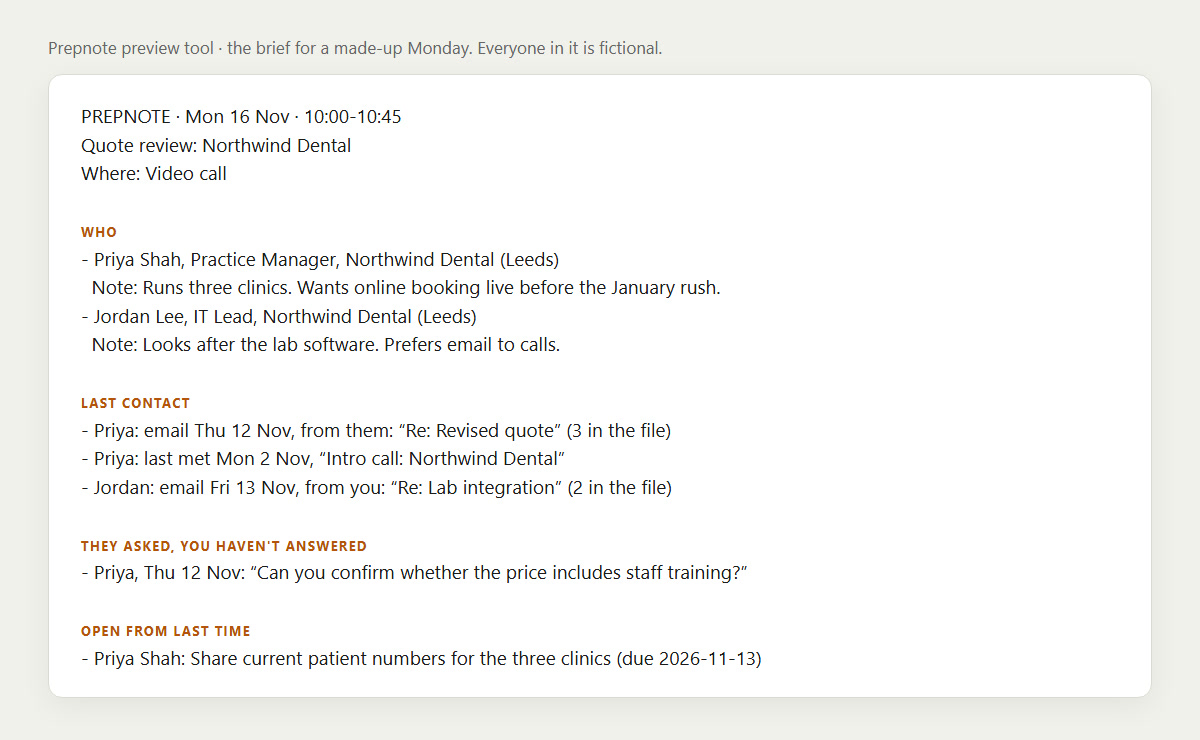
The real output of the preview tool on a made-up Monday. Everyone in it is fictional.
On that sample Monday there were 5 meetings. Two had outside guests, so two briefs were written. 3 of the 4 guests were found in the contacts file and the fourth was flagged. From 14 emails, Prepnote picked out a client's unanswered question, "Can you confirm whether the price includes staff training?", and left out a second guest's question because it had already been answered.
After: decisions, tasks and a draft for each person
- Record the meeting, and tell people you're recording.
- Turn the recording into text with WhisperX on your own computer.
- Give the transcript to the Bot, or to the preview tool.
You get the decisions, a task list by person with real dates ("by Friday" becomes Fri 20 Nov), and one follow-up email per guest, saved as a draft. Nothing is sent.
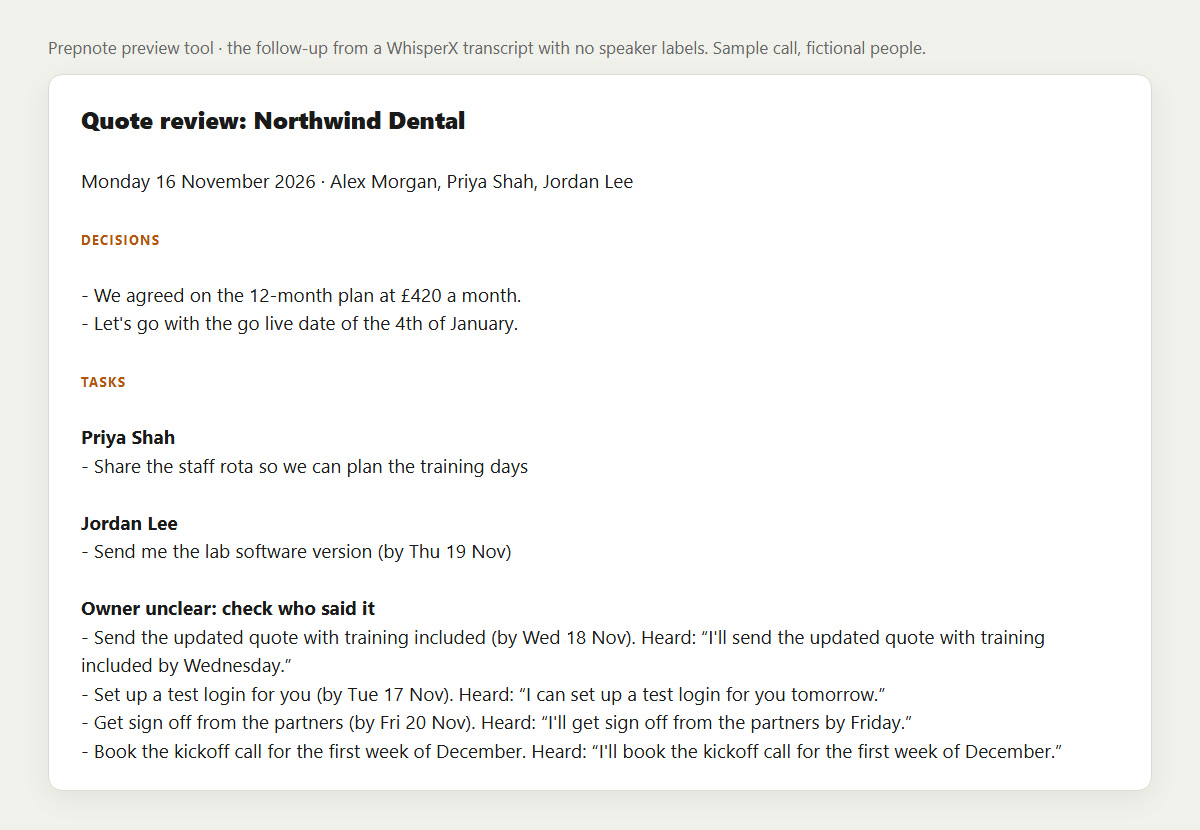
The follow-up from a WhisperX transcript of our sample call, with no speaker labels.
What our test found
We wrote an 18-line, three-person sales call, had three Windows text-to-speech voices read it out, and ran the 1 min 49 s recording through WhisperX 3.8.6 (small.en model, on the CPU, no graphics card used):
- Speed: 27 seconds. The first run took 43 seconds, because it downloads a 360 MB model once.
- Accuracy: 1 word wrong out of 218 ("the" for "a"). It also wrote five numbers as digits, such as "£420" for "four hundred and twenty pounds".
- Decisions: 2 of 2 found.
- Tasks: 6 of 6 found, and all 5 spoken deadlines turned into the right date.
- Who owns each task: only 2 of 6. This is the weak spot. A plain WhisperX transcript doesn't say who is speaking, so "Jordan, can you send me the version?" gets an owner, but "I'll send the quote" doesn't. Prepnote puts those under "Owner unclear" with the sentence quoted, and doesn't guess. When we gave it the same call with speaker names, all 6 got the right owner.
Computer voices are clear and never talk over each other, so a real meeting will do worse than this. We haven't tested one yet.
The parts
- WhisperX makes the transcript. It's free, its code is BSD-2-Clause, and it runs on a normal PC. Speaker labels are optional: they need a free Hugging Face token and you have to accept the speaker model's terms. We didn't test that part.
- Twenty is the open-source CRM where your contacts live. Prepnote looks guests up there and saves the meeting note and tasks back to it. Twenty is mostly AGPL-3.0, with some files under a paid licence. Prepnote only talks to its API.
Grok Bot runs on its own cloud computer, so it can't reach a Twenty that only runs on your laptop. Host Twenty on a small server with an HTTPS address, or skip it and keep contacts in a CSV file.
The skill, the routine, the preview tool and the sample files are on GitHub: Obiwayne/prepnote. For a version with no Grok Bot at all, see the voice to tasks blueprint.
Try the preview on your own computer
It needs Python 3.10 or later and nothing else, and it sends nothing.
- Download the repo and run the two sample commands in its README. That takes about a minute.
- For your own day, export your calendar (Google Calendar: Settings, Import & export, Export), your mail (Google Takeout, Mail only) and your contacts as a CSV file with an email column.
- Run
python -m prepnote brief --ics calendar.ics --mbox mail.mbox --people people.csv --me you@yourcompany.com. - After a meeting, run
pip install whisperx, thenwhisperx meeting.mp3 --model small.en --language en --device cpu --compute_type int8 --output_format json, thenpython -m prepnote followup --transcript meeting.jsonwith your name and the guests' addresses.
The preview tool finds tasks with simple patterns such as "I'll", "can you" and "we agreed". It shows what a transcript holds without anything leaving your computer. On Grok Bot, the Bot does that reading itself.
What it costs
Grok Bot comes with X Premium ($30/month), Super and Ultra, and shares one weekly allowance with Cursor and the Grok apps (Cursor help). A shared allowance can run out, so Prepnote:
- runs once each weekday morning, 5 scheduled runs a week
- does a follow-up only when you ask, one per meeting
- sends a shorter brief if the allowance is past 70%
- never hands work to a second Bot, and won't reply if another Bot messages it
We can't yet say how much of the allowance a week of Prepnote uses, because we haven't run it on a plan. WhisperX is free. Twenty is free to host yourself, and you pay for the server.
What can go wrong
- No brief "15 minutes before". Grok Bot routines run on a schedule, and xAI's documentation lists no calendar trigger. Checking the calendar every 15 minutes would be 36 runs a working day instead of 1. Prepnote sends all the day's briefs in one morning message. Ask "prep me for the 2pm" if you want a fresh one.
- It won't know who said "I'll do it" unless the transcript has speaker labels. Expect to assign some tasks yourself.
- Real recordings are messier than our sample call. Check names, numbers and dates before you send a follow-up.
- Recording rules differ. Many places need everyone's consent. Say you're recording at the start.
- Untested on Grok Bot, on a live Twenty and on a real meeting. The Twenty part was tested against a stand-in server, using field names from Twenty's source code for v2.58.0.
FAQ
Is there a free AI meeting assistant?
The transcription and the preview tool here are free and run on your own computer. The morning message needs Grok Bot, which comes with X Premium at $30 a month.
Can an AI meeting prep assistant research the people I'm meeting?
Prepnote uses what you already hold: your CRM, your email and your calendar. It doesn't search the web for people unless you ask, and it doesn't guess facts about them.
How do I turn a meeting summary into action items?
Transcribe the recording, then list each sentence where someone takes a job on ("I'll send", "can you check") with the person and the date. Prepnote does this and marks any task whose owner isn't clear.
Does it auto-send meeting notes?
No. It writes one follow-up per guest as a draft. With Grok Bot, a draft goes out only when you reply "send" and the person's name.
Does a bot join my call?
No. You record the call yourself with whatever you already use, and WhisperX turns the file into text afterwards.
Do I need Grok Bot to use Prepnote?
For the morning message, yes. The preview tool works on its own, and the skill reads as plain instructions for any agent with calendar and Gmail access, though we've written it for Grok Bot and tested it on none.